# VirtualBox で Marvericks を起動して Boxen をビルド & スクラップする (したい)
*2014-04-19*
> VirtualBox で Marvericks を起動して Boxen をビルド & スクラップするための設定を行いました。
会社で新しく入ってきた人の開発環境を Mac のローカルに構築しようと、[Boxen] の導入を数回試みましたが、**失敗して、都度トラブルシュートする必要がある**ので、大変でした。
事前に構築の検証ができて、品質が保証できていれば、この様な問題は起きにくいだろうと思っていたところ、Qiita で、**[Mac 上の VirtualBox に Mavericks をインストールする][qiita-entry]** というエントリーを見つけ、まさにこの著者が、僕と同じモチベーションで VM で Marverics 環境を作るということを実践されていたので、自分も試してみました。
## VM を作成
VM 作成は前述 [Qiita エントリー][qiita-entry]通りに作業したら、問題なく作成できました。
### Image 作成
まず、[Marvericks Installer][Marvericks] を [Mac AppStore][Marvericks] からインストールし、以下のコマンドを実行し、インストールイメージを作る。
```bash
git clone https://github.com/ntkme/InstallESD.dmg.tool
cd InstallESD.dmg.tool
bin/iesd -t BaseSystem -i /Applications/Install\ OS\ X\ Mavericks.app/Contents/SharedSupport/InstallESD.dmg -o ~/Output.dmg
```
### Machine 設定
一応、自分の設定のスクリーンショットを晒しておきます。
母艦にスクショを残したまま、法事で帰省しているので、週明け追加します。
## authorized_keys 設定
Host から SSH ログインしたいので、公開鍵を設定しておく。
```bash
cd ~
mkdir .ssh
curl https://github.com/ngs.keys > .ssh/authorized_keys
chmod 700 .ssh
chmod 400 .ssh/authorized_keys
```
## VM 用の鍵を作る
```bash
ssh-keygen && cat ~/.ssh/id_rsa.pub
```
公開鍵を GitHub の [SSH Keys] 画面でコピペ
## command line developer tools をインストールする
[Xcode] は [Mac AppStore][Xcode] から。`llvm` だったり `make` だったりを使えるようにする。
```bash
xcode-select --install
```
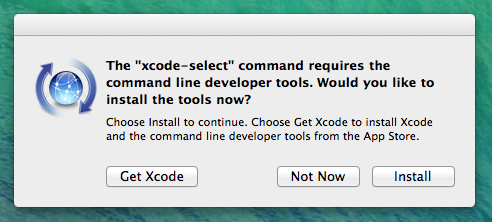
インストールプロンプトが出るので Install ボタンをクリック。
## Xcode の利用規約に同意する
git コマンドを使おうとしたら以下の様な警告がでた。
```
Agreeing to the Xcode/iOS license requires admin privileges, please re-run as root via sudo.
```
sudo で xcodebuild コマンドを実行。
```bash
sudo xcodebuild -license
```
利用規約が出てくるので、CTRL+F キーでスクロールダウン。最後に `agree` とタイプする。
## our-boxen チェックアウト
```bash
sudo mkdir -p /opt/boxen
sudo chown -R $USER:staff /opt/boxen
cd /opt/boxen
git clone git@github.com:$MY_COMPANY/our-boxen.git repo
cd repo
export BOXEN_NO_FDE=1 # 検証のみなので、FDE はオフる。
```
## json gem
json gem がうまく入らない
```
Gem files will remain installed in /opt/boxen/repo/.bundle/ruby/2.0.0/gems/json-1.8.1 for inspection.
Results logged to /opt/boxen/repo/.bundle/ruby/2.0.0/gems/json-1.8.1/ext/json/ext/generator/gem_make.out
An error occurred while installing json (1.8.1), and Bundler cannot continue.
Make sure that `gem install json -v '1.8.1'` succeeds before bundling.
Can't bootstrap, dependencies are outdated.
```
普通に `gem install` してもダメだった。
```bash
sudo gem install json -v '1.8.1'
```
```
clang: error: unknown argument: '-multiply_definedsuppress' [-Wunused-command-line-argument-hard-error-in-future]
clang: note: this will be a hard error (cannot be downgraded to a warning) in the future
```
[この記事](https://langui.sh/2014/03/10/wunused-command-line-argument-hard-error-in-future-is-a-harsh-mistress/)を参考にして、`ARCHFLAGS` をつけて再施行
```bash
sudo ARCHFLAGS=-Wno-error=unused-command-line-argument-hard-error-in-future gem install json -v '1.8.1'
```
## Two factor authentication
なぜか、Two factor authentication が On になっているとうまく動かない
```bash
./script/boxen --debug
```
```
GitHub login: |ngs|
GitHub password: *************
--> It looks like you have two-factor auth enabled.
One time password (via SMS or device):
*******
--> That one time password didn't work. Let's try again.
```
手動で OAuth Token を[作成][newtoken]し、`--token` パラメータをつけて、もう一度やり直す。
```bash
./script/boxen --debug --token $GH_TOKEN
```
次は Keychain のエラーが起きた。
```
Boxen Keychain Helper: Encountered error code: -25308
Error: User interaction is not allowed.
/opt/boxen/repo/.bundle/ruby/2.0.0/gems/boxen-2.6.0/lib/boxen/keychain.rb:48:in `set': Can't save GitHub API Token in the keychain. (Boxen::Error)
from /opt/boxen/repo/.bundle/ruby/2.0.0/gems/boxen-2.6.0/lib/boxen/keychain.rb:30:in `token='
from /opt/boxen/repo/.bundle/ruby/2.0.0/gems/boxen-2.6.0/lib/boxen/config.rb:73:in `save'
from /opt/boxen/repo/.bundle/ruby/2.0.0/gems/boxen-2.6.0/lib/boxen/cli.rb:48:in `run'
from ./script/boxen:80:in `'
```
以下のコマンドでキーチェーンをアンロックする。
```bash
security unlock-keychain ~/Library/Keychains/login.keychain
```
再施行すると、やっと最後まで通りました。
```
./script/boxen --debug --token $GH_TOKEN
```
No Trouble で構築できるように、ブラッシュアップ頑張ります。
## 未解決: Retina ディスプレイ
Mac Pro で上のところまで完了して、Mac Book Pro Retina 15 で同じことをしようとしたところ、めちゃくちゃパフォーマンスが悪かったです。マウスが自分の操作通り動いてくれません。
色々調べて、Extension Pack をインストールしたりしましたが、まだ解決していません。何かわかったら書きます。
### 参照
* [Download VirtualBox](https://www.virtualbox.org/wiki/Downloads)
* [Poor graphics performance on retina display with VirtualBox 4.2.x](https://www.virtualbox.org/ticket/11606)
[qiita-entry]: http://qiita.com/hnakamur/items/fca6379213a3033cb29d
[SSH Keys]: https://github.com/settings/ssh
[Boxen]: http://boxen.github.com/
[newtoken]: https://github.com/settings/tokens/new
[Marvericks]: https://itunes.apple.com/app/id675248567?mt=12
[Xcode]: https://itunes.apple.com/app/id497799835?mt=12