# Swift で開発した Web アプリケーションを Amazon EC2 Container Services (ECS) にデプロイする
*2016-03-04*
## TL;DR
Swift で Web アプリケーションを開発するのは、とても楽しいです 🤘
[Amazon EC2 Container Services] にもデプロイして稼働させることができるので、軽量な [Docker] イメージを自動的にビルドし、高速にデプロイする方法を調査しました。
こちらにサンプルプロジェクトを公開しましたので、よかったら参考にしてみて下さい :point_down:
- https://github.com/ngs/Swifton-TodoApp
- https://hub.docker.com/r/atsnngs/docker-swifton-example/
- https://circleci.com/gh/ngs/Swifton-TodoApp
また、こちらの内容を、弊社 Oneteam のミーティングスペースで行った [Tokyo Server-Side Swift Meetup] で発表しました。
参照: https://one-team.com/blog/ja/2016-03-07-swift-meetup/
以下は、その資料です。
## Swift の Web フレームワーク
Swift 言語が [オープンソース] になってから、いくつかの Web アプリケーションフレームワークがでてきました。
- [Kitsura](https://developer.ibm.com/swift/products/kitura/)
- [Nest](https://github.com/nestproject/Nest)
- [Perfect](http://perfect.org/)
- [Slimane](https://github.com/noppoMan/Slimane)
- [Swifton]
## Swifton
どれが一番良いのかは、まだ判断できていませんが、今回は Swift で作った Ruby on Rails 風のフレームワーク [Swifton] を使って、サンプルアプリケーションを動かしてみました。
インターフェイスは、とても簡単に理解できます:
```swift
import Swifton
import Curassow
class MyController: ApplicationController {
override init() {
super.init()
action("index") { request in
return self.render("Index")
// renders Index.html.stencil in Views directory
}
}
}
let router = Router()
router.get("/", MyController()["index"])
serve { router.respond($0) }
```
## Swifton TodoApp
Swifton は、ToDo 管理のサンプルアプリケーションを公開しています: [necolt/Swifton-TodoApp]
このプロジェクトは、既に Dockerfile と Heroku の設定 (`app.json` と `Procfile`) を含んでいます。
これらは、問題なく動作し、これを元に開発が始められます。ただ、本番運用を考慮すると、Heroku ではなく、なじみのある、Amazon EC2 Container Service (ECS) を使いたいと思いました。
## 大きな Docker イメージ
前途のとおり、このプロジェクトは Dockerfile を含んでおり、ECS でも動作が可能な Docker イメージをビルドすることができます。
しかし、このイメージには、コンテナ内部で Swift ソースコードをビルドするための依存ライブラリが含まれており、イメージサイズで 326 MB、仮想サイズで 893.2 MB もの容量を消費します。
```
REPOSITORY TAG IMAGE ID CREATED VIRTUAL SIZE
sha256:c35f9 30 seconds ago 893.2 MB
```

参照: https://hub.docker.com/r/atsnngs/docker-swifton-example/tags/
そこで、バイナリは Docker ビルドの外で行い、最小限の資材で構成するイメージを CircleCI で構築することを、ためしてみました。
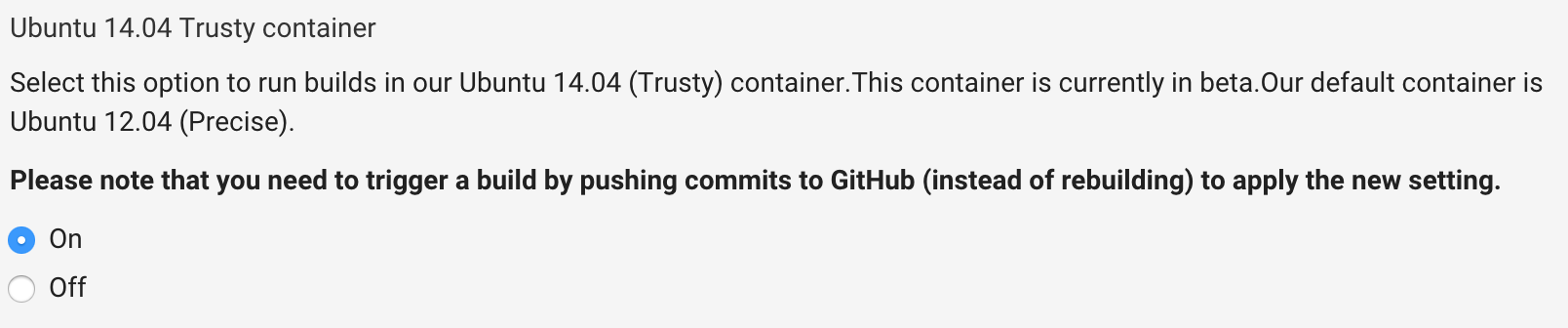
## CircleCI の Ubuntu 14.04 Trusty コンテナ
Swift ランタイムは、Trusty Ubuntu (14.04) でビルドされた、開発スナップショットを使います。
https://swift.org/download/#latest-development-snapshots

それに合わせて、パブリックベータとして提供されている、CircleCI の Trusty コンテナを採用しました。
http://blog.circleci.com/trusty-image-public-beta/
## 継続ビルドのための必須ソフトウェア
まず、`swift build` を実行するために、以下のソフトウェアをインストールする必要があります。
```sh
sudo apt-get install libicu-dev clang-3.6 jq
# jq は AWS CLI の応答を調査するために使います。
sudo update-alternatives --install /usr/bin/clang clang /usr/bin/clang-3.6 100
sudo update-alternatives --install /usr/bin/clang++ clang++ /usr/bin/clang++-3.6 100
# See: https://goo.gl/hSfhjE
```
## Swifton アプリケーションを実行するための資材
- Swift ランタイムの共有ライブラリ: `usr/lib/swift/linux/*.so`
- アプリケーションのバイナリ
- Stencil テンプレート
上記が必要なので、不要なファイルは `.dockerignore` ファイルで無視し、Docker イメージのビルド時間を節約します。
```
*
!Views
!swift/usr/lib/swift/linux/*.so
!.build/release/Swifton-TodoApp
```
## Dockerfile
Dockerfile はこんな感じです。[オリジナル] に比べて、とても簡素です。
```sh
FROM ubuntu:14.04
MAINTAINER a@ngs.io
RUN apt-get update && apt-get install -y libicu52 libxml2 curl && \
apt-get clean && \
rm -rf /var/lib/apt/lists/* /tmp/* /var/tmp/*
ENV APP_DIR /var/www/app
RUN mkdir -p ${APP_DIR}
WORKDIR ${APP_DIR}
ADD . ${APP_DIR}
RUN ln -s ${APP_DIR}/swift/usr/lib/swift/linux/*.so /usr/lib
EXPOSE 8000
CMD .build/release/Swifton-TodoApp
```
この Dockerfile によって、イメージサイズを 88 MB、仮想サイズを 245.8 MB (27.5%) へ削減することができました。
```
REPOSITORY TAG IMAGE ID CREATED VIRTUAL SIZE
sha256:0d31d 30 seconds ago 245.8 MB
```

## Docker イメージをテストする
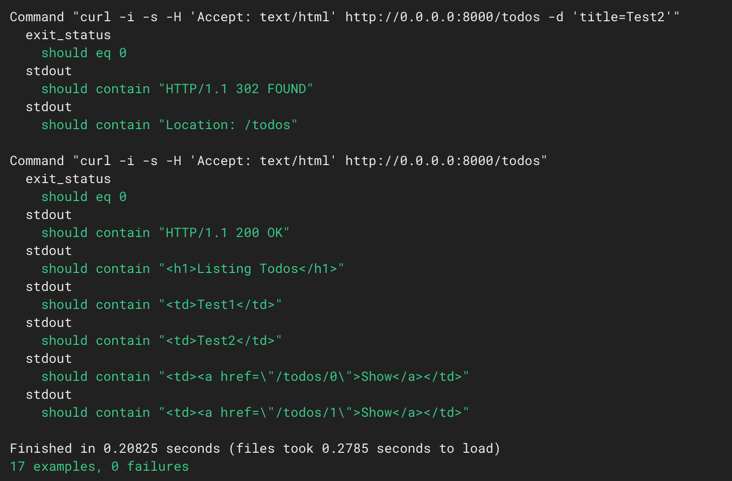
[Serverspec] を使って、Docker イメージを安心して利用できるよう、テストします。
以下の記事に、CircleCI で Docker コンテナをテストする、いくつかのコツと、モンキーパッチを紹介しています。
https://ja.ngs.io/2015/09/26/circleci-docker-serverspec/
こんな感じで、ToDo アプリのテストを書きました:
```ruby
require 'spec_helper'
describe port(8000) do
it { should be_listening }
end
describe command('curl -i -s -H \'Accept: text/html\' http://0.0.0.0:8000/') do
its(:exit_status) { is_expected.to eq 0 }
its(:stdout) { is_expected.to contain 'HTTP/1.1 200 OK' }
its(:stdout) { is_expected.to contain 'Listing Todos
' }
end
1.upto(2) do|n|
describe command("curl -i -s -H \'Accept: text/html\' http://0.0.0.0:8000/todos -d \'title=Test#{n}\'") do
its(:exit_status) { is_expected.to eq 0 }
its(:stdout) { is_expected.to contain 'HTTP/1.1 302 FOUND' }
its(:stdout) { is_expected.to contain 'Location: /todos' }
end
end
describe command('curl -i -s -H \'Accept: text/html\' http://0.0.0.0:8000/todos') do
its(:exit_status) { is_expected.to eq 0 }
its(:stdout) { is_expected.to contain 'HTTP/1.1 200 OK' }
its(:stdout) { is_expected.to contain 'Listing Todos
' }
its(:stdout) { is_expected.to contain 'Test1 | ' }
its(:stdout) { is_expected.to contain 'Test2 | ' }
its(:stdout) { is_expected.to contain 'Show | ' }
its(:stdout) { is_expected.to contain 'Show | ' }
end
```
## ECS にデプロイする
ECS にデプロイするまえに、Docker イメージをレジストリに転送 (push) する必要があります。
```sh
$ docker tag $DOCKER_REPO "${DOCKER_REPO}:b${CIRCLE_BUILD_NUM}"
$ docker push "${DOCKER_REPO}:b${CIRCLE_BUILD_NUM}"
```
ここでは、詳しい、ECS 環境の構築方法は解説しません、[AWS ECS ドキュメンテーション] を参照して下さい。
[デプロイスクリプト]は、ビルドプロセスのデプロイステップの中で実行されます。
このスクリプトは、以下の操作を [AWS コマンドライン インターフェイス] を用いて行います。
- タスク定義 (Task Definition) JSON を [ERB テンプレート] からレンダリングします。
- タスク定義を、更新、もしくは作成し、`swifton-example-production:123` の様な形式の最新リビジョンを取得します。
- サービスを、新しいタスク定義で更新、もしくは、それを用いて作成します。
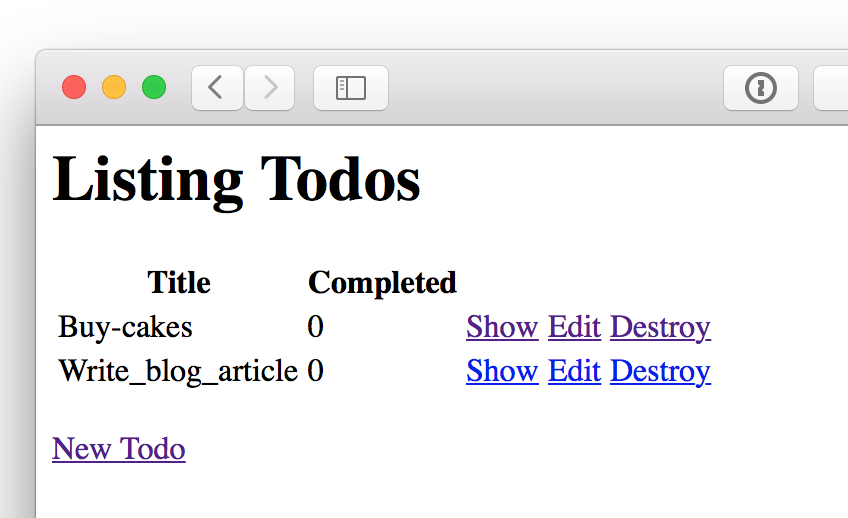
デプロイすると、ウェブブラウザで、以下の様に ToDo サンプルアプリケーションが確認できると思います。
ぜひ、Swift での Web アプリケーション開発を楽しんで下さい!もし何かあれば、フィードバックよろしくお願いします。
https://github.com/ngs/Swifton-TodoApp
[swifton]: https://github.com/necolt/Swifton
[オープンソース]: https://github.com/apple/swift
[オリジナル]: https://github.com/necolt/Swifton-TodoApp/blob/master/Dockerfile
[necolt/swifton-todoapp]: https://github.com/necolt/Swifton-TodoApp
[amazon ec2 container services]: https://aws.amazon.com/ecs/
[docker]: https://www.docker.com/
[serverspec]: http://serverspec.org/
[デプロイスクリプト]: https://github.com/ngs/Swifton-TodoApp/blob/master/script/ecs-deploy-services.sh
[erb テンプレート]: https://github.com/ngs/Swifton-TodoApp/blob/master/script/ecs-deploy-services.sh
[aws ecs ドキュメンテーション]: http://docs.aws.amazon.com/ja_jp/AmazonECS/latest/developerguide/ECS_GetStarted.html
[aws コマンドライン インターフェイス]: https://aws.amazon.com/cli/
[tokyo server-side swift meetup]: http://connpass.com/event/27667/